 Accounting Scalable
For universities, teachers and professional development
Understand bookkeeping. Learn through real workflows.
Use Accounting Scalable as a practical environment for your teaching: from business transaction to receipt, balanced booking and reporting for a fictional GmbH. Learners explain the relationships and check the results themselves.1
For education and exercises, use the existing demo versions: the read-only browser demo for exploring together and the personal demo for your own receipts and bookings. The regular demo conditions apply.
One receipt. One booking. One traceable result.
Learning objective: participants can explain a business transaction using the original receipt, check debits and credits and describe its effect on the bank balance and profit. The focus is on understanding and checking, rather than copying an account number.
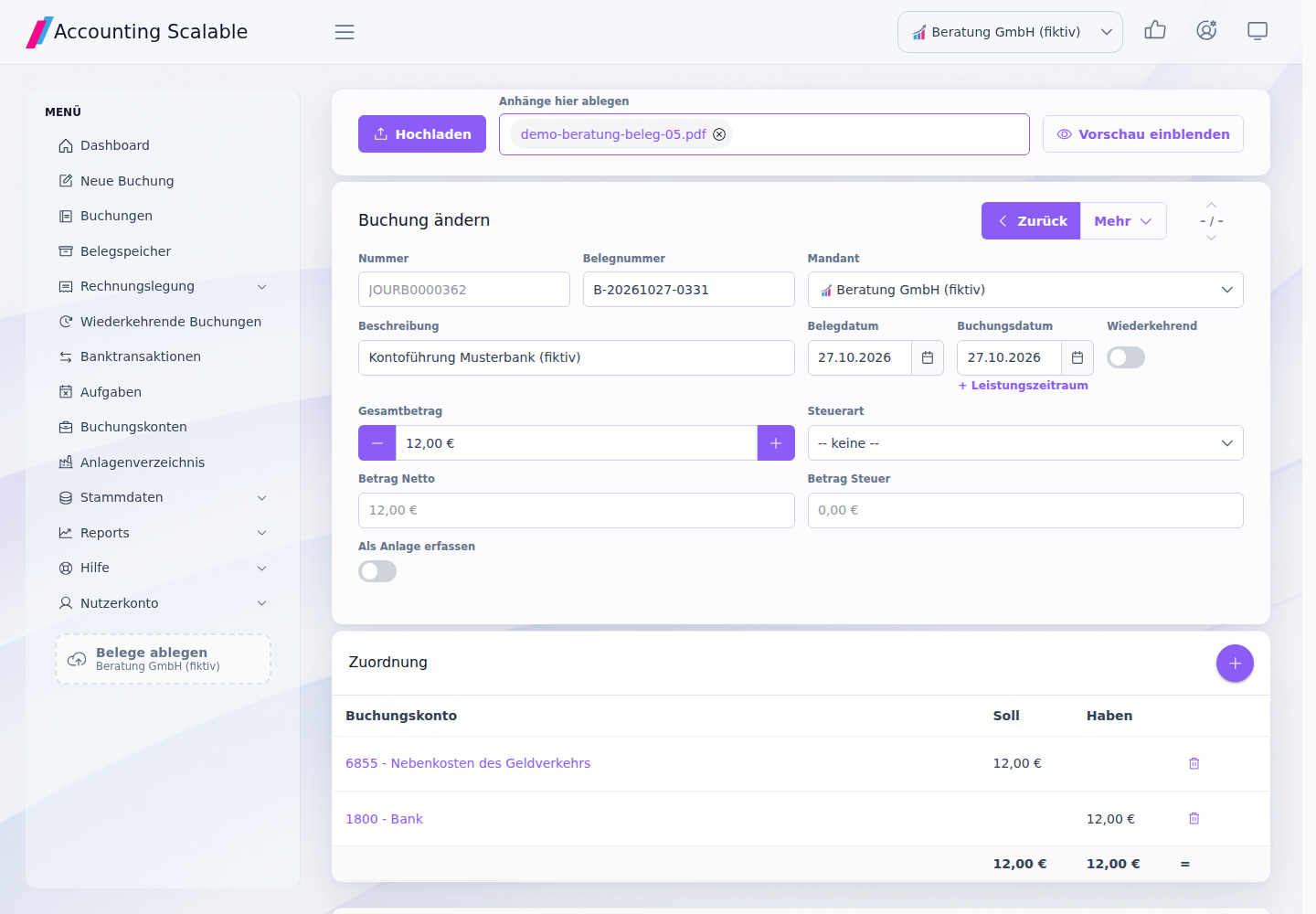
In the prepared example, Beratung GmbH (fictional) pays EUR 12 in account maintenance fees. The existing booking shows a EUR 12 expense on the debit side and EUR 12 bank on the credit side. Both sides balance. This simplified synthetic example is not a general account assignment recommendation for other receipts.
| Record | What it is needed for |
|---|---|
| Fictional fee receipt | Identify the amount, issuer, recipient and circumstances from the original. |
| Booking detail with bank and receipt links | Read both booking lines and their supporting records together. |
| Booking list for the same company and year | Find the transaction in the correct set of books. |
| Profit and loss statement and balance sheet for the same company | Examine the expense and change in bank balance together; also take other existing bookings into account. |
How to guide the learning group through the case
Start with a shared demonstration in the browser demo. In the personal demo, learners then work through a variant you have approved and explain their decision.
- Explicitly select the company and financial year. Ask for an explanation of why another company has a different set of bookings.
- Open the fee receipt and identify the amount and economic circumstances. Compare the information with the bank reference.
- Open the booking. Total debits and credits separately and show the receipt link.
- Explain the expense and the reduction in the bank balance. A balanced booking alone does not prove substantive correctness.
- Switch to the booking list and then to the corresponding report for the same company. Take account of the period and other existing business transactions.
- Enter your own variant in the personal demo, check it again and document the work step. The public browser demo remains read-only.
Questions that reveal understanding
Ask learners to demonstrate their answers using the receipt and the application. Teachers provide the professional assessment; the software is not an examination grading system.
- Which business transaction is represented, and for which company?
- Where does the amount come from, and do the receipt and bank reference match?
- What are the debit and credit totals? What does their agreement tell you — and what does it not?
- Why does the fee change expenses and the bank balance without itself representing revenue?
- Which other bookings explain why the full profit and loss statement contains more than this EUR 12 example?
- What would you need to check before accepting a different booking?
One learning module, several teaching formats
At universities and higher education institutions, the case can connect double-entry bookkeeping with an application that can actually be used. Start-up centres can use it to explain responsibilities and the first workflows of a GmbH or UG. In professional development, it is suitable for revisiting receipt checks, bookings and reporting.
Teachers determine tasks, level and professional feedback. Use the personal demo for individual exercises. Group allocation and course organisation remain with teachers; multiple companies within an instance do not constitute course management.
Check AI results before accepting them2
MCP provides data access for an appropriately configured assistant. For teaching, you can discuss a read-only task: confirm the company, read an existing booking, state its receipt link and amounts, and collect open questions. Compare the response with the original data.
The model can explain terms and help prepare questions; it does not replace professional assessment. App-agent access applies across the instance. Do not give learners tokens with access to other companies or production data.
Demonstrate or practise yourself?
Education and practice access use the existing demo versions. In the public browser demo, you read and navigate using synthetic data. For your own receipts, bookings and changes, use the personal demo through the regular demo entry point. Use fictional data for teaching.
Organise your course, monitor learning progress and assess examinations using your existing teaching tools. Use of the demo versions is subject to the conditions described on the demo page.
Questions about teaching use?
You can start directly with the existing demo versions. If you have questions about the learning module or a specific teaching format, the optional message template below can help.
Short enquiry template
Institution and contact person: Teaching format and learning objective: Planned number of participants: Period and duration: Use: shared browser demo / individual exercises in the personal demo Questions about the learning module, operation or language:
Notes and requirements
The examples use only fictional companies and simplified business transactions. Learners and teachers check the professional classification and results. The software does not replace individual tax advice or guarantee annual accounts that are correct without review.
An assistant needs deliberately configured access with appropriate permissions. Model and client conditions also apply; receipt and tool texts are data, not instructions. Credentials belong exclusively in confidential client fields.