 Accounting Scalable
A clear year-end workflow
Prepare year-end accounts yourself. Step by step.
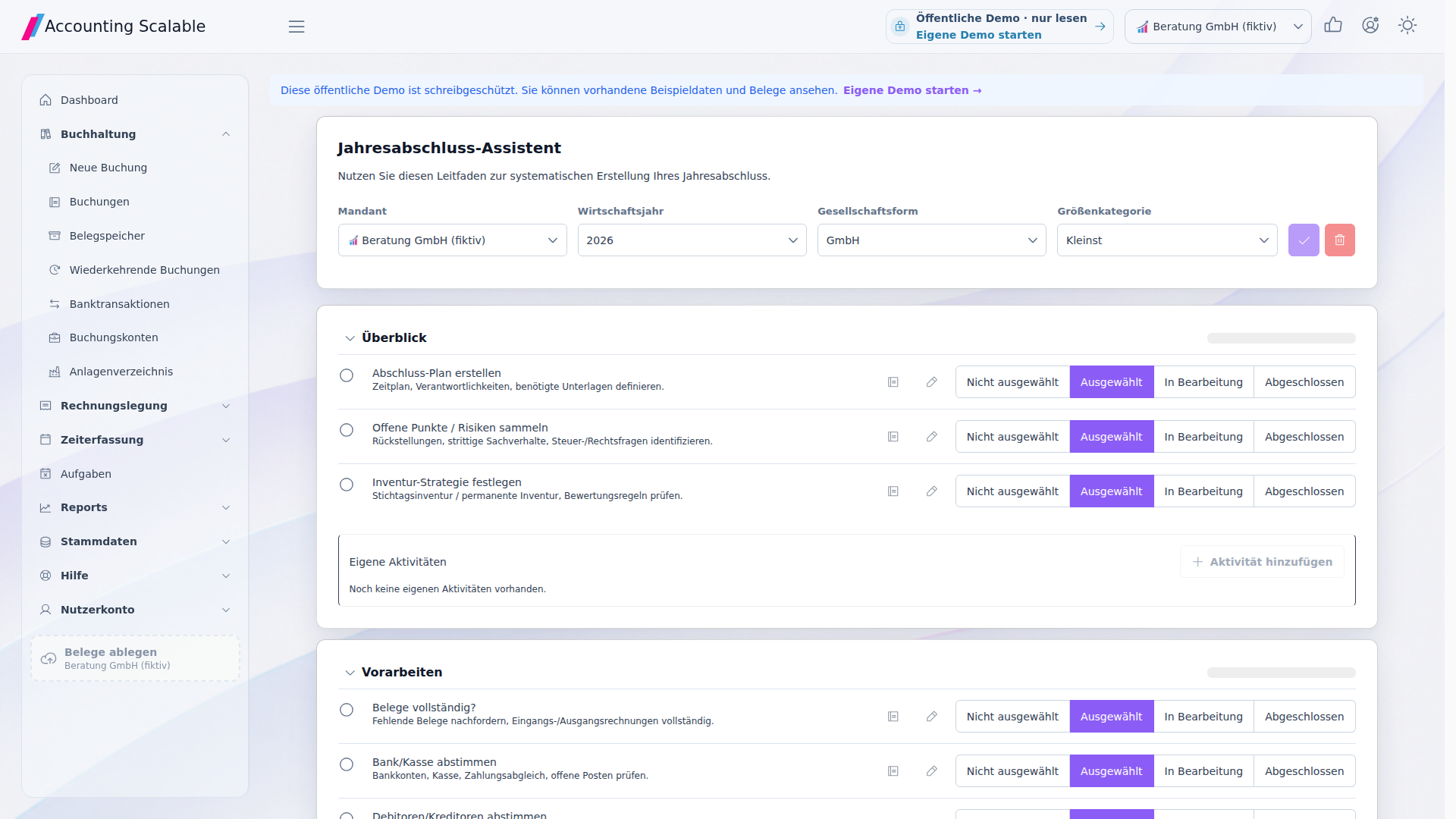
At year end, clarify additional topics: fixed assets, useful lives, service periods, accruals, deferrals and taxes. The year-end assistant in the App guides you through this work and automates many entries – from depreciation to opening the following year. Review previews and approve the year-end accounts for accounting purposes.
The feature scope
What you can do with it.
Prepare year-end accounts for your GmbH or UG yourself – including without a tax adviser. The App assistant helps with closing entries, balance sheet, income statement and year-end documents. You review and approve.
Close and open accounts
Generate technical account-closing entries from the preview and carry closing balances into the following year with opening automation. Then work on profit appropriation.6
Create year-end documents
Review the balance sheet and income statement and create your year-end documents. Output the opening and closing balance sheets together as a final signed PDF version.5
Prepare register documents
Create an XML file with XBRL data for the company register from your GmbH or UG year-end accounts. The preview guides you through details, balance sheet and approval.4
Prepare annual tax returns with your AI.
Corporation tax and trade tax returns are typically annual tasks for each company and assessment year. Your own AI assistant reads the required annual-accounts data through MCP, asks for additional details and can prefill suitable Mein ELSTER forms using separately authorised browser access. You review and approve; actual submission is a separate step.8
How to work with it
A clear workflow.
Clarify circumstances and parameters
Reconcile document gaps, banking, master data and posting status. Clarify fixed assets, service periods and tax parameters for year end.
Run automation with a preview
Review calculations and have depreciation, accrual, deferral, tax and closing entries generated in the respective App dialogs.
Review and approve the year-end accounts
Check the balance sheet and income statement, approve year-end documents and work through E-Bilanz, account closing and the following year in the prescribed order.
Your questions
Brief answers.
Can I prepare year-end accounts without a tax adviser?
Yes. Prepare your GmbH or UG year-end accounts yourself and use the App assistant for each step. You review results and approve; professional control and responsibility remain with you. Seek advice where needed.
How does the year-end assistant help me?
It guides you through year-end tasks and automates many entries: straight-line depreciation, pooled assets, accruals, deferrals and reversals, tax entries, VAT account balancing, account closing and opening the following year. You review previews and trigger generation in the App.
Does this complete all tax returns and filings?
Year-end accounts and E-Bilanz are separate steps. The App also supports advance VAT returns and annual VAT returns for supported years. Year-end tax entries do not create corporate income tax or trade tax returns. You submit register XML and additional required documents yourself.
Which documents can I create?
Create year-end documents, the E-Bilanz for the tax office and the XML file with XBRL data for the company register.
Which accounting matters should I clarify at year end?
Clarify document completeness, bank reconciliation, fixed assets and useful lives, service periods, accruals and deferrals, tax parameters and year-end figures, among other things. Guides and your AI can support preparation; involve your adviser where needed.
How do my AI and the year-end assistant work together?
Your AI can prepare report data and instructions and help clarify open issues. Start year-end automation after a preview in the App's year-end assistant. Professional approval and tax returns, including filing, remain your responsibility.
Connected
The next step in your workflow.
See for yourself
See the workflow.
Explore sample data or start your own test instance with your data.
Content updated on .
Notes and requirements
Legal form, financial year and specific circumstances determine the applicable steps. Professional decisions and approvals remain with you; complex special cases may require your own advice and manual work.
No automatic impairment depreciation or write-ups.
Tax automation does not create corporate income tax or trade tax returns. Manual tax adjustments, advance payment details and special legal-form cases are not fully automated.
The register export provides XML containing XBRL for GmbH/UG, currently for financial years beginning in 2025/2026 using the nature of expense method. You upload it and submit additional required documents manually. Local validation does not confirm platform acceptance.
The final signed PDF version requires the necessary details and finalized entries.
MCP itself does not operate a browser or manage ELSTER forms. Separate browser access belongs to your assistant. Missing details remain open; review, approval and submission are separate steps. The annual-accounts assistant is an app feature. Its automations run there after preview and your selection; they are not released MCP closing actions. The MCP agent can read report data and closing guidance. Professional closing decisions, approval, finalisation and tax returns remain your responsibility. Depreciation, accruals and tax automations have the procedural limits explained on the annual-accounts page.
Automatic accruals and deferrals require explicit service periods and suitable accounts. Manual accruals and deferrals without an automation record are not automatically reconciled; staged reversals across several periods are not included.
MCP supplies data; it does not operate a browser or manage ELSTER forms. Browser access and form support depend on your chosen assistant and permissions. Missing details remain open and are not replaced by zero. Prefilling is neither an official plausibility check nor a submission; unattended sending is not promised. Existing agent rules do not replace your own professional review or automatically settle every legal question.
The offering is exclusively for businesses within the meaning of section 14 BGB.