 Accounting Scalable
Bookkeeping & documents
Turn documents into traceable bookkeeping.
Your bookkeeping begins with each business transaction. Accounting Scalable connects documents, accounts and entries in one interface. Check account allocation and track what is still missing in the dashboard.
Speed in your bookkeeping
Respond promptly. Work with fewer detours.
1. Technical speed: shorter waits
What matters while working is how quickly a view loads and responds to input: opening a document, filtering the posting list or selecting another company. Already loaded views can reuse existing resources; an initial request loads additional data and program components.
2. Faster workflows: fewer detours
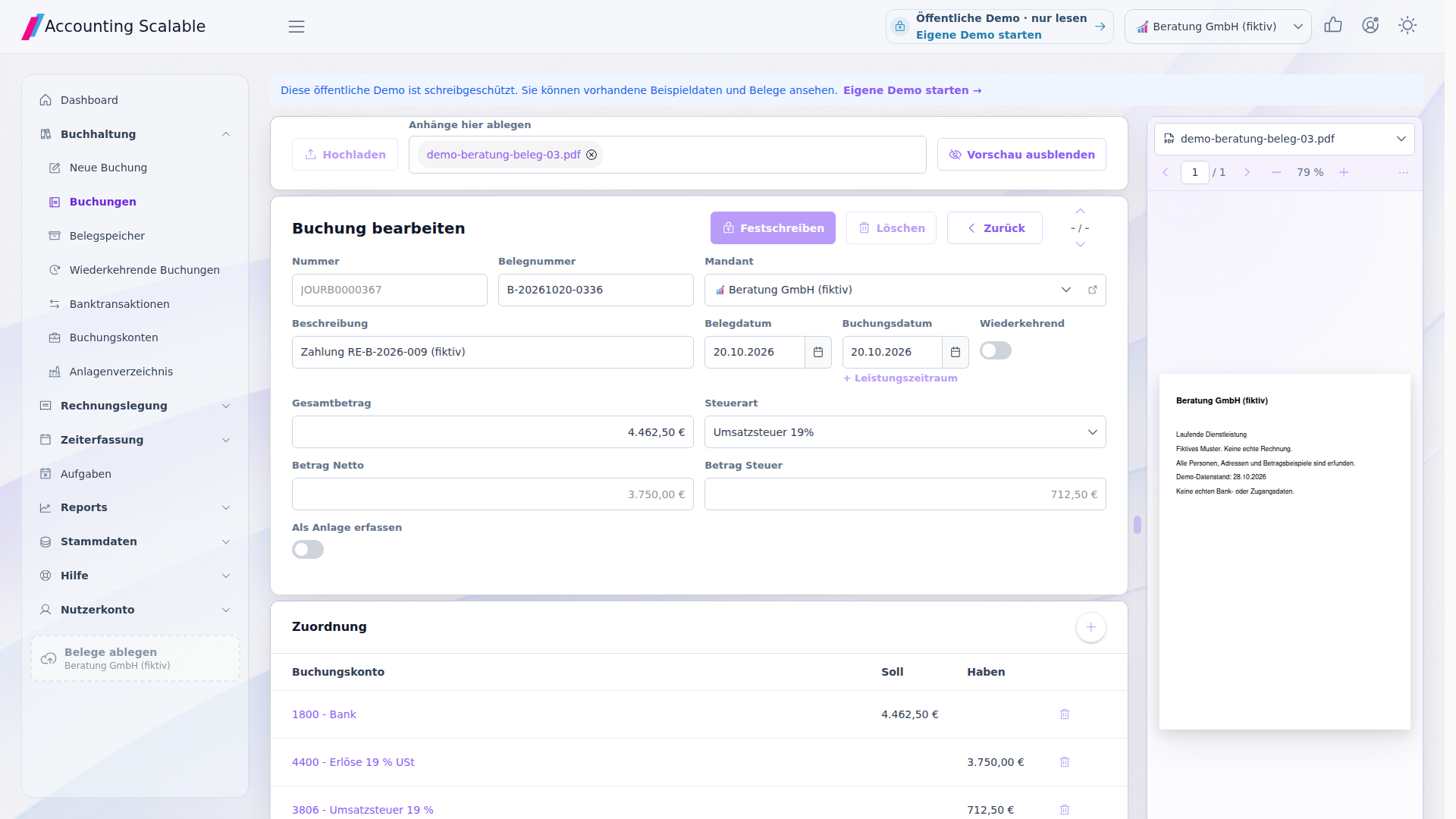
Work on the document, entry and bank link in one application. Switch work steps in the same context instead of manually passing files between tools. The company remains explicitly selected; professional reviews and approvals remain your responsibility.
- Open a document
Open an existing document from document storage or its linked entry. Check the original and continue to the associated entry.
- Filter entries
Narrow the posting list with the available filters and open a result. This lets you check accounts and document links from the same workspace.
- Switch company
Select the other company in the company menu. Continue working with its own dataset; switching does not combine separate books.
- Link a document to an entry
In an editable entry, select the appropriate existing document and save the link. Check company, transaction and file. Your own changes require a personal instance with write permissions.
The feature scope
What you can do with it.
Collect documents, record business transactions and track progress – with SKR03- and SKR04-compatible account templates.
Debit and credit in balance
Record business transactions with balanced posting lines and the appropriate document link.2
The accounts you need
Start with SKR03- and SKR04-compatible account templates. Add accounts and maintain a suitable chart of accounts per company.1
Documents first, posting later
Store PDF, JPEG, PNG and XML documents in document storage. Link them to the appropriate entry later.4
Prepare recurring work
Use recurring entries from Holding upwards for regular business transactions. Tasks with due dates, notes and an assignee are included in all three plans.
Understand VAT
Record input VAT, output VAT and reverse charge using the appropriate accounts and tax rules.
Changes and finalization
Track relevant changes and finalize reviewed entries. The dashboard makes outstanding work visible.3
Installable online PWA
Capture documents where they arise
Open the online PWA in its own App window and store document files from your device in the appropriate company. On supported devices, you can also pass files to the installed App through the share dialog.5
- 01 /
Select receipt file
Select PDF, JPEG, PNG or XML on your device. Alternatively, use “Share” if your system offers the installed app as a destination.
- 02 /
Check company
Select the right company and check that the receipt belongs to it. Installing the app does not replace this assignment.
- 03 /
File it and keep working
Store the receipt, find it again and check it during the subsequent booking workflow. An internet connection is required.
How to work with it
A clear workflow.
Store a document
Select the company and upload the document or open an existing bank transaction.
Review an entry
Add the date, accounts and tax type. Check debit, credit and the document link.
Complete the current work
Save the entry, check open points and finalize the reviewed state.
Your questions
Brief answers.
How do I start with my chart of accounts?
Choose SKR03- or SKR04-compatible templates and add the accounts your company needs.
Can I store documents before posting?
Yes. Collect documents in storage and link them to an entry later.
Connected
The next step in your workflow.
See for yourself
See the workflow.
Explore sample data or start your own test instance with your data.
Content updated on .
Notes and requirements
Account templates contain a selection of common accounts; they do not represent complete SKR catalogs.
For foreign currency transactions, EUR valuation and any exchange differences still require professional review. Not every matching workflow calculates an exchange rate.
Entry finalization and the change log support traceable workflows. Software alone does not guarantee GoBD compliance.
Documents are limited to 20 MiB per file and your instance's storage quota.
The PWA requires an internet connection. Installation and file transfer depend on browser and operating system. In supported Chromium environments, the installed App can appear as a share target. Without such a share target, select the file directly in the App. An iOS share target is not part of the described workflow. A native app-store app or offline bookkeeping is not offered.
The offering is exclusively for businesses within the meaning of section 14 BGB.