 Accounting Scalable
Guide · As of
Prepare GmbH and UG annual accounts yourself: workflow and practice
You can prepare your GmbH's or UG's annual financial statements yourself. Start with reconciled documents, bank balances and other balances, clarify valuations and year-end questions, then check the balance sheet, income statement and documents needed for your company. You check the results, give approval and take responsibility for accounting and tax decisions; seek targeted advice on individual open questions where needed.1
Who is it for? Managing directors of small GmbHs/UGs with manageable, documented business transactions and knowledge of double-entry bookkeeping; not a specialist guide for group, restructuring, liquidation or complex valuation cases.3
Annual returns for each company and assessment year
Corporation tax and trade tax returns are typically annual tasks for each company and assessment year. Your own AI assistant reads the required annual-accounts data through MCP, asks for additional details and can prefill suitable Mein ELSTER forms using separately authorised browser access. You review and approve; actual submission is a separate step.
Define the working basis and period
Select the correct company and financial year. Have current bank statements, supporting documents, existing opening or prior-year balances and a list of open questions ready. An interface that looks complete does not prove that the documents are complete.
Create a working status that distinguishes available documents from unresolved transactions. This lets you check later how a year-end figure was derived.
Basics: GmbHG §41: Management and bookkeeping · HGB §242: Balance sheet and income statement
Reconcile bank transactions, documents and balances
Compare postings and bank statements and clarify transactions without supporting documents. Check open customer and supplier transactions, fixed assets and other balances. A payment may settle an already recorded transaction; it is not automatically a new expense or revenue.
Allocate services and expenses to the correct financial year. Contracts, service periods and information on outstanding invoices help with this cut-off assessment.
Basics: HGB §252: Valuation principles
Clarify accounting questions before running automation
Valuations, useful lives, accruals and tax parameters are decisions for the user. A software suggestion can help prepare these decisions, but does not assess your circumstances for you. Keep assumptions and reasons with the documentation.
Check the preview of an automated process before generating closing entries. Then compare the result with the defined working status. The automation available depends on the described app scope.
Basics: HGB §253: Valuation and depreciation · GmbHG §41: Management and bookkeeping
Review the balance sheet, income statement and required documents
The balance sheet and income statement form part of the annual financial statements. Corporations generally have further requirements; size category and statutory reliefs affect the documents needed. Do not automatically treat a balance sheet PDF as a complete package for every company.
Check periods, company details, values and the additional information required for your case. Document approvals and keep the version used with your records.
Basics: HGB §242: Balance sheet and income statement · HGB §264: Annual financial statements of a corporation
Which document leads to which result?
Record your own review step for each basis used. The table distinguishes document review, posting and later submission; it does not replace a missing supporting document.
On narrow screens, you can scroll the table sideways. With a keyboard, focus the table first.
| Record | Your own review step | Verifiable result | Where in the workflow? |
|---|---|---|---|
| Bank statements and payment data | Reconcile existing postings with bank transactions/balances | Unresolved differences and their resolution documented | Before closing entries |
| Purchase/sales documents and open items | Check the supply received, period and payment status | Transaction recorded completely and without duplication | Reconciliation |
| Fixed asset documentation | Check classification, useful life and posting status | Documented basis for fixed asset recognition/depreciation | Valuation and preview |
| Contracts and period details | Clarify the correct financial year/cut-off treatment | Documented allocation to the correct period | Resolve accounting questions before automation |
| Year-end preview, balance sheet and income statement | Check completed postings and reports | Version of the annual financial statements to be approved | Preparation/approval |
| Tax/registry documents | Check required data, deadlines and separate submission channels | Task and evidence documented for each process | After year-end review |
Three routes instead of a supposed single overall filing
Annual financial statements are the result of your year-end work. E-Bilanz is a separate submission of tax data; tax returns have their own scope. Registry documents are additionally prepared for the Unternehmensregister and filed there.
Creating a file does not confirm its acceptance by the tax office or registry. For each process, check the requirements, deadline, version to be approved and evidence of submission or acceptance separately.
Basics: EStG §5b: E-Bilanz · HGB §325: Disclosure · HGB §326: Disclosure reliefs
How to work with the app wizard
Select the company and financial year and work through year-end activities using guides and your own notes. For supported automated processes, first view the preview: for example depreciation, accruals, tax postings, VAT account reconciliation and account closing. You trigger generation yourself and check the resulting postings.
Check the balance sheet and income statement and prepare the required year-end documents. The combined opening/closing balance sheet can be output as a final signed PDF; this requires the necessary information and finalised postings. E-Bilanz, VAT returns and the registry file are separate steps within the described feature scope. Corporation/trade tax returns do not arise solely from tax postings.
For the E-Bilanz, data, taxonomy artefact, mapping, validation and instance configuration must match the specific year and profile. Registry export creates supported XML/XBRL documents; you upload them and submit any additional required documents yourself. A successful export is not evidence of acceptance.
Little or no revenue: still check the working status
A GmbH or UG remains a corporation even without sales revenue. Having no revenue therefore does not generally mean that annual financial statements are unnecessary. Bank fees, contributions, liabilities or purchases can still belong to the financial year.
Check the actual records and relevant reliefs rather than just total revenue. A small volume often makes the work plan shorter, but does not replace a review of the tasks that apply.
Basics: GmbHG §13: Commercial company · HGB §242: Balance sheet and income statement · HGB §264: Annual financial statements of a corporation
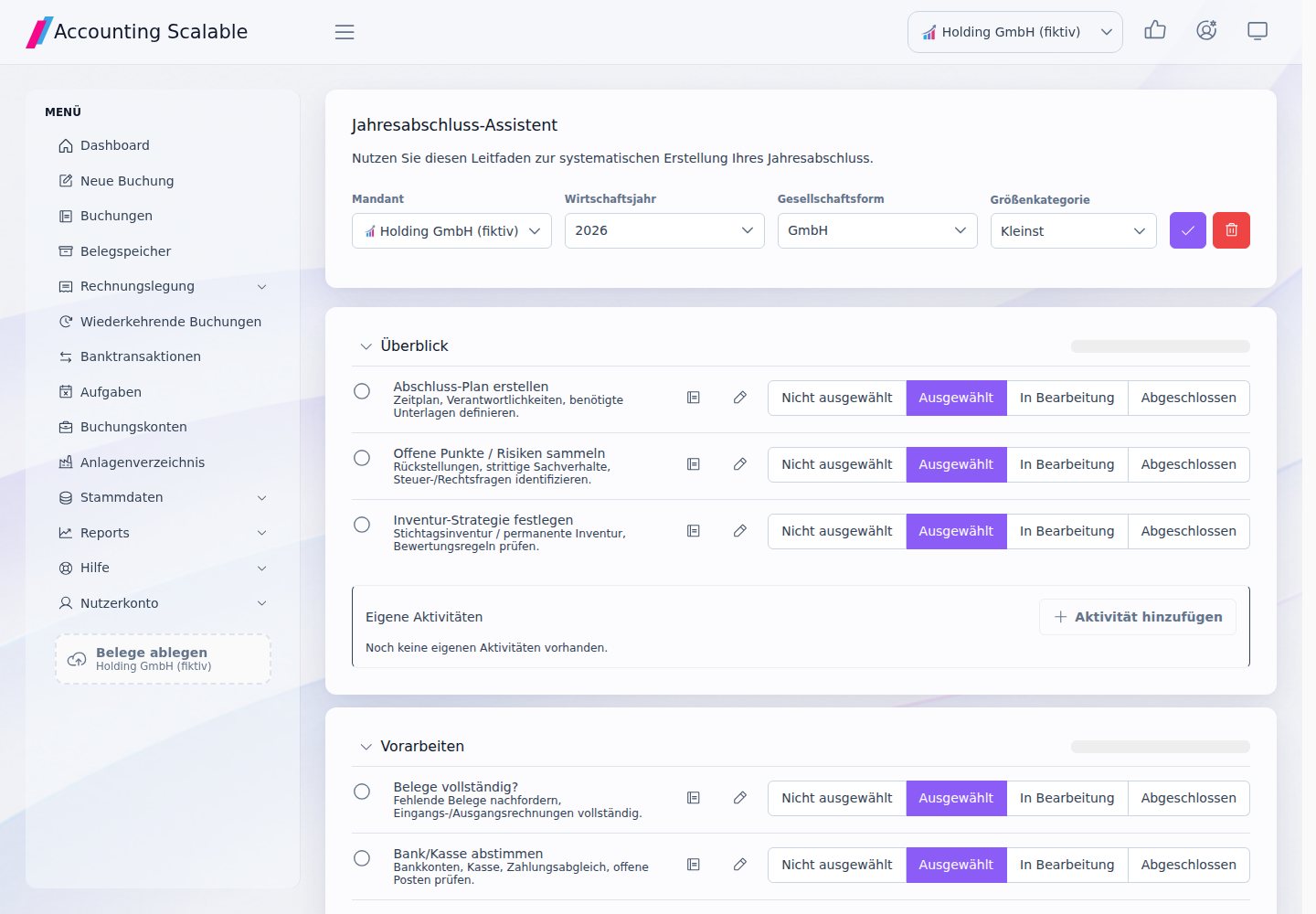
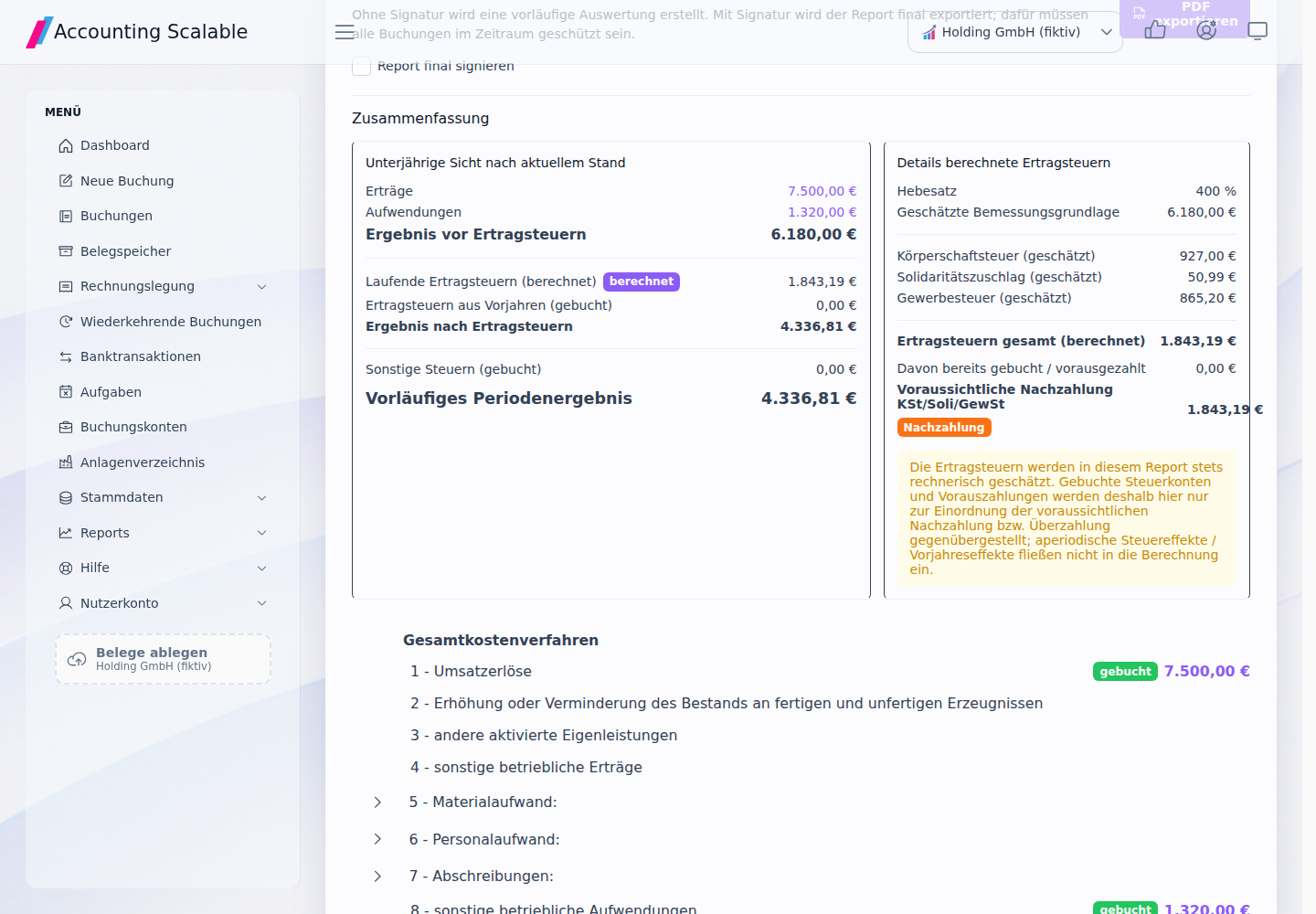
Fictional test case: trace the company and year-end status2
The existing synthetic demo data includes Holding GmbH (fictional) and other separate companies. For this limited workflow, an existing year-end closing is opened in the correct company and its status compared with the related tasks and reports.
Initially, only the company overview is selected. After the workflow, the company, year, year-end activities and related report can be found specifically. The test views show the actual app; they do not evidence final tax approval, an actual submission to the tax office or economic savings.
Sources and information date
- HGB §242: Balance sheet and income statement
Publisher: Bundesministerium der Justiz / Bundesamt für Justiz. Legal/information status: 3 November 2026. Retrieval / comparison: 2026-11-03.
- HGB §264: Annual financial statements of a corporation
Publisher: Bundesministerium der Justiz / Bundesamt für Justiz. Legal/information status: 3 November 2026. Retrieval / comparison: 2026-11-03.
- HGB §325: Disclosure
Publisher: Bundesministerium der Justiz / Bundesamt für Justiz. Legal/information status: 3 November 2026. Retrieval / comparison: 2026-11-03.
- HGB §326: Disclosure reliefs
Publisher: Bundesministerium der Justiz / Bundesamt für Justiz. Legal/information status: 3 November 2026. Retrieval / comparison: 2026-11-03.
- GmbHG §13: Commercial company
Publisher: Bundesministerium der Justiz / Bundesamt für Justiz. Legal/information status: 3 November 2026. Retrieval / comparison: 2026-11-03.
- GmbHG §41: Management and bookkeeping
Publisher: Bundesministerium der Justiz / Bundesamt für Justiz. Legal/information status: 3 November 2026. Retrieval / comparison: 2026-11-03.
- HGB §253: Valuation and depreciation
Publisher: Bundesministerium der Justiz / Bundesamt für Justiz. Legal/information status: 3 November 2026. Retrieval / comparison: 2026-11-03.
- HGB §252: Valuation principles
Publisher: Bundesministerium der Justiz / Bundesamt für Justiz. Legal/information status: 3 November 2026. Retrieval / comparison: 2026-11-03.
- EStG §5b: E-Bilanz
Publisher: Bundesministerium der Justiz / Bundesamt für Justiz. Legal/information status: 3 November 2026. Retrieval / comparison: 2026-11-03.
See the right workflow for yourself.
Start with synthetic examples in the read-only demo. Then check your own test records in your personal instance.
Notes and requirements
This article provides general information and does not constitute individual tax advice. You remain responsible for reviewing your bookkeeping, annual financial statements and tax returns. This general working guide does not replace individual tax or legal advice. You review and take responsibility for your information and approvals. You can seek targeted advice on individual unresolved technical questions.
All explicitly fictional cases and app views use test data. They are not customer reports, evidence of time or cost savings, or universal templates for tax account assignment.
The software supports the app scope described on each page. Annual accounts, tax returns/e-balance and register filings are separate tasks; supported years, formats, instance configuration and your approvals determine the available workflow. MCP supplies data; only a suitable, separately authorised assistant operates a browser. Missing details remain open. Prefilling, your approval and actual submission are separate steps.